
Download Speed Install – software installer, PC setup, quick install, app downloader, Windows utility
Overview
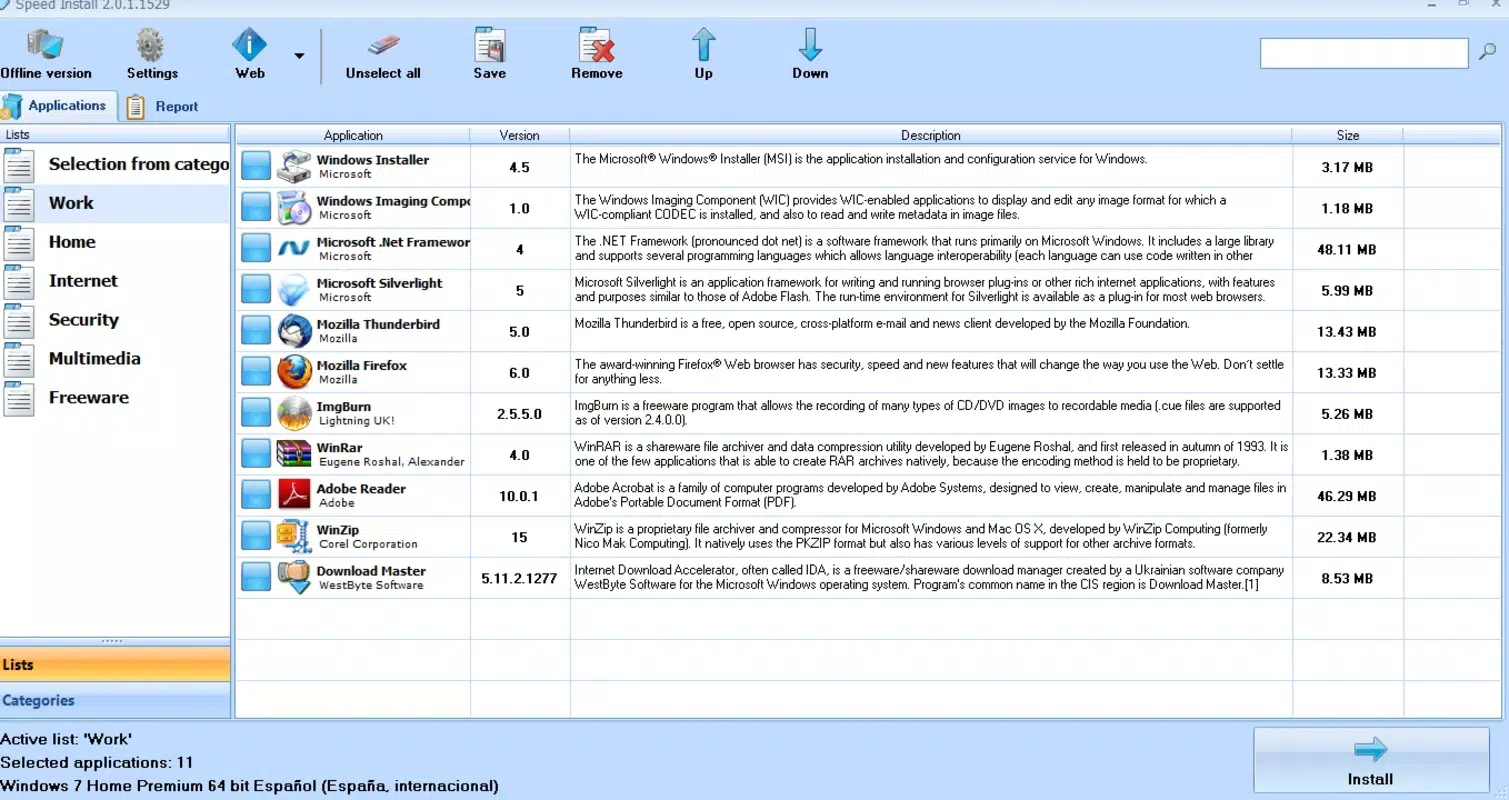
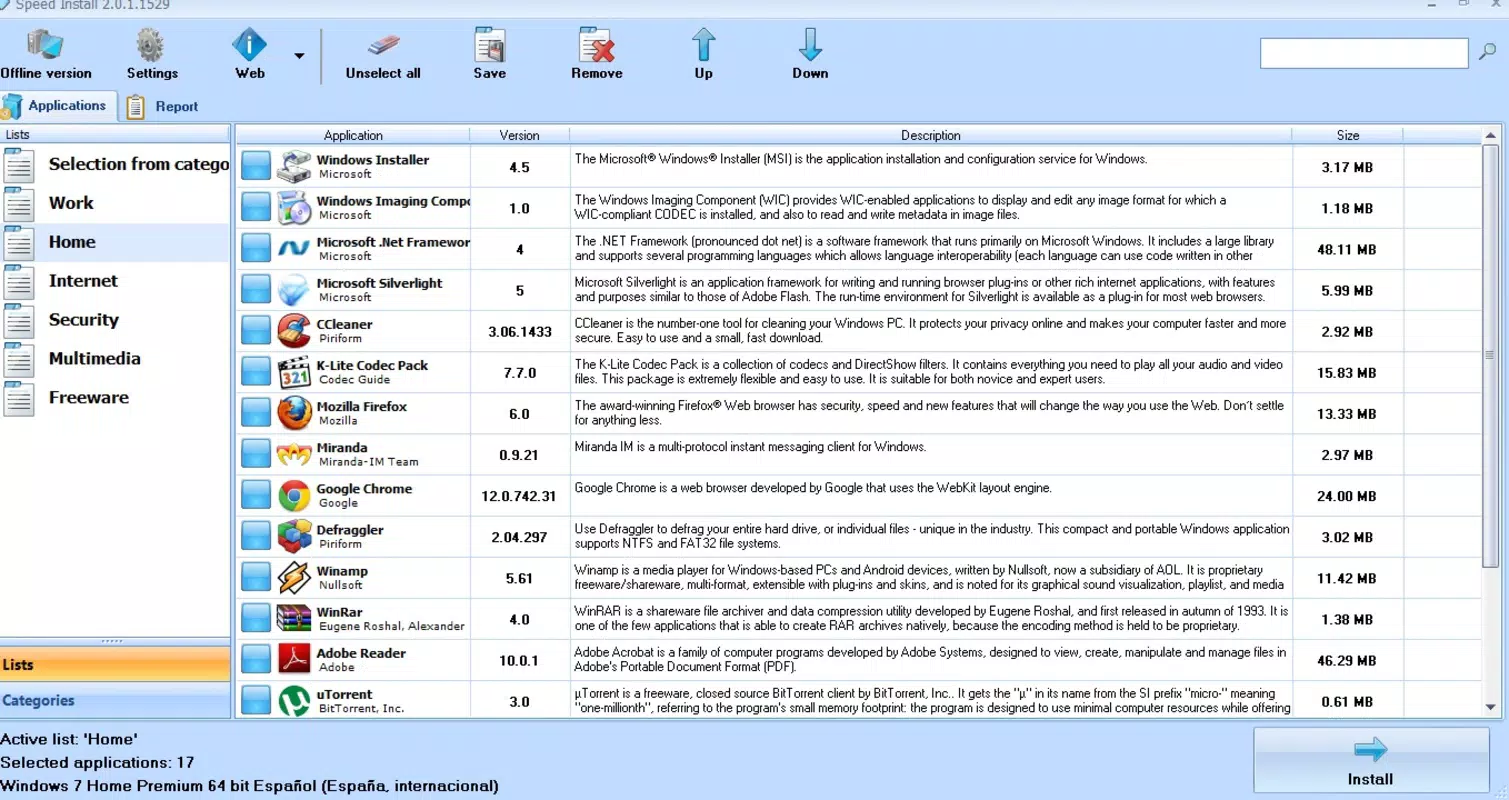
Speed Install is a lightweight utility designed to simplify the process of downloading and installing software directly onto Windows-based PCs. The app is particularly useful for users who are setting up a new machine or restoring a recently formatted system, as it enables rapid deployment of essential applications in a fraction of the time required by traditional methods. By organizing software into intuitive categories such as productivity tools, games, and video editing utilities, Speed Install reduces the complexity of finding and installing programs from scattered sources.
This streamlines the initial setup phase, making it ideal for both novice users and those seeking efficiency. The application operates as a centralized hub, eliminating the need to search multiple websites or navigate through cluttered download portals. Although the developer did not provide additional technical details about the app’s architecture or backend processes, its core purpose remains clear: to serve as a fast, reliable, and user-focused tool for system initialization.
In the broader context of the Windows utility ecosystem, Speed Install fills a niche for users prioritizing speed and simplicity over advanced customization. Its enduring presence since its release in 2012 suggests a consistent user need for streamlined software installation. Real-world use cases include IT professionals deploying systems at scale, students setting up lab computers, and home users rebuilding their machines after a reset.
Key Features & Functionality
- User-Friendly Interface: The app features a clean, minimal design that emphasizes accessibility. Users can navigate through software categories without requiring prior technical knowledge, reducing the learning curve for new users.
- Quick Installation Process: With a single click, users can initiate the download and installation of selected applications. The process is automated, minimizing manual intervention and reducing the risk of errors during setup.
- Categorized Software Library: Applications are grouped into logical categories—productivity, entertainment, utilities, and more—enabling efficient browsing and discovery of relevant tools based on user needs.
- Efficient System Setup: Designed specifically for new or reinstalled systems, Speed Install allows users to install multiple applications in a single session, significantly cutting down on setup time and effort.
For example, a student setting up a new laptop can use Speed Install to quickly access and install essential software like word processors, web browsers, and media players—all from one interface. Similarly, a home user rebuilding their PC after a system failure can restore their digital environment without retracing every software source. The app’s focus on speed and simplicity enhances productivity during critical setup phases, making it a valuable tool for users who prioritize efficiency over advanced configuration options. Although the developer did not list specific integration features or update mechanisms, the functionality appears optimized for standalone use with minimal system impact.
Interface, UX & Performance
Speed Install presents a straightforward interface with a focus on clarity and ease of use. The layout is organized around a central navigation panel that lists software categories, allowing users to browse and select applications with minimal effort. Visual elements are kept simple, avoiding unnecessary animations or clutter that could hinder usability.
Navigation is linear and predictable, with a clear path from selection to installation initiation. The app does not appear to include complex settings or configuration menus, which contributes to a streamlined user experience. Although the developer did not list formal performance metrics, the app’s file size of 3.1 MB suggests a lightweight footprint, likely resulting in fast load times and minimal resource consumption.
Responsiveness across different device categories—such as desktops, laptops, and low-end systems—is expected due to its minimal design and lack of heavy dependencies. Stability is implied by the app’s long-standing presence since 2012, though no specific crash reports or error logs were provided. Users can expect consistent behavior during installation workflows, with no indication of frequent hangs or freezes.
The absence of real-time progress tracking or detailed logs may limit transparency for advanced users, but it aligns with the app’s goal of simplicity. Overall, the interface supports a frictionless experience for users seeking a no-nonsense approach to software deployment.
Platform Compatibility & Technical Requirements
Speed Install is designed for the Windows operating system. The current version is 1.2.0, with a file size of 3.1 MB, indicating a compact and efficient installation package. The developer did not specify minimum OS requirements, nor did they list compatibility details for specific Windows versions such as Windows 7, 8, 10, or 11.
As such, users should exercise caution when installing on newer systems, particularly if the app relies on outdated libraries or APIs. The absence of detailed technical specifications means that compatibility with modern Windows environments cannot be confirmed. However, the app’s long release history suggests it may still function on older systems, though performance on newer hardware may vary.
Users are advised to check system compatibility before installation, especially if running a 64-bit or updated Windows environment. The app is available for free, making it accessible to a broad audience without financial barriers. No additional permissions or background services were disclosed, which may contribute to its lightweight nature and reduced impact on system performance.
Pros and Cons
Pros
- Lightweight design with a small file size of 3.1 MB
- Intuitive interface ideal for users with limited technical experience
- Streamlines the setup of new or formatted PCs
- Offers categorized access to a wide range of software types
- Free to download and use, with no in-app purchases
Cons
- Developer did not provide detailed compatibility information for Windows versions
- No visible update mechanism or changelog available
- Limited transparency regarding software sources and verification processes
- Minimal customization options for installation preferences
- Outdated release date (2012) raises concerns about long-term support and security
FAQ
Is Speed Install safe to download and install?
The app is free and available from official sources, but the developer did not provide verification details or security certifications. Users should ensure they download from trusted platforms and scan the file with antivirus software before installation.
Can I use Speed Install on Windows 10 or Windows 11?
While the app was released in 2012, the developer did not specify compatibility with Windows 10 or 11. Users are advised to test the app on their system to confirm functionality.
Does Speed Install update automatically?
The developer did not list any automatic update feature. Users may need to manually check for new versions or rely on external sources for updates.
What types of software are available in Speed Install?
Applications are organized into categories such as productivity tools, games, video editing software, and utilities. The exact list of available software was not disclosed in the provided information.
Is Speed Install available for macOS or Linux?
Based on the provided details, Speed Install is only confirmed for Windows. No information was given about availability on other operating systems.
Final Thoughts + CTA
Speed Install remains a notable example of a focused, no-frills utility for Windows users looking to accelerate their system setup process. Despite its age and lack of modern features, its core functionality—streamlining software installation through categorization and simplicity—still holds value for specific use cases. It is particularly beneficial for individuals who prioritize speed and ease of use over advanced customization.
While the absence of updated compatibility data and automatic updates raises some concerns, the app’s lightweight nature and free availability make it a low-risk option for those in need of a basic installer tool. For users setting up a new PC or recovering from a system reset, Speed Install offers a practical shortcut to getting essential software up and running quickly. Its enduring presence since 2012 speaks to a persistent demand for straightforward solutions in the productivity space.
While it may not be the most advanced tool available today, it continues to serve a niche audience effectively. Download Speed Install now to simplify your next PC setup.


